


Glassdoor | Jobs & Careers
4.727.73K Reviews
App Specs
- Version
- 13.10.0
- Updated On
- License
- Free
- Downloads
- 10,000,000+
- Developer
- Indeed, Inc.
- Categories
- Business
- Platform
- Android, iOS
Screenshots
 Analysis by AppCompare
When I use Glassdoor | Jobs & Careers to look into a role or employer, the experience is shaped by being connected: job listings, company feedback, salary information and interview discussions are most useful when I can load and compare them as questions come to mind. That makes it less like a document I consult once and more like a research tool I dip into during the search. It’s a business app from Glassdoor LLC., and its appeal is the chance to bring several kinds of career research together on a phone.
That convenience has a practical limit. A weak connection can interrupt the flow of opening a listing, checking a company’s reviews and then returning to the search. I’d treat the app as a way to investigate and organize possibilities, not as the only place to keep important application details. If I’m heading into a meeting or commuting through an area with patchy service, I make a note of the role and questions I want to revisit rather than assuming every page will be ready when I need it.
Research that works best in short, connected sessions
The most useful way I’ve found to approach Glassdoor is to follow a specific decision rather than browse without a goal. For example, if a recruiter contacts me about a position, I can search for the company, read employee perspectives, check salary context and look at interview questions. Each step answers a different question: what the work environment may be like, whether compensation expectations seem aligned, and what preparation might be relevant.
Those pages are not substitutes for one another. A company rating gives a quick overview, but reviews can reflect different teams, managers and moments in time. Salary information can help me prepare for a conversation, but it should not be treated as a guaranteed offer for my exact experience or location. Interview accounts can suggest topics to practise, not predict the precise questions I’ll hear. The value is in combining clues while keeping those limits in view.
Using it between errands, commutes and interviews
On a normal busy day, I might see a promising opening during a lunch break, save it, then return later when I have time to judge whether it’s worth pursuing. That small pause matters: a job title alone can sound appealing, while the description, company feedback and compensation context may change my view. Saved listings help turn a passing glance into a shortlist I can review deliberately.
For interview preparation, I’d use the app in two passes. First, look up the employer and scan for recurring themes rather than letting one vivid review dominate. Then check the interview material and write down a few questions or examples to prepare. Doing this before the day of the interview is more useful than trying to load and digest everything while waiting outside the room, especially if the connection is unreliable.
Glassdoor can also be useful when I’m not actively applying. If I’m considering a move months from now, I can use a short session to learn which roles appear relevant and what employees discuss about the organizations I’m curious about. Still, if I only want to maintain professional contacts or message people in my field, a networking-focused service is a better fit; Glassdoor’s distinct strength is workplace research tied to jobs.
Worth Reading Before You Choose

EA SPORTS FC Mobile 26 Is a Bigger Football Game, but It Takes Time

Flipboard Shows What News Apps Must Do Beyond the Feed

Switching to Android Auto Means Rethinking Your Driving Routine

Google Calendar Makes a Crowded Week Easier to Manage

Ludo King Makes the Most of the Minutes Between Plans

Baby Panda World Brings Quick Play to Modern Phones, but Its Game Library Feels Busy
What to do when pages or searches don’t cooperate
Because the experience depends on retrieving current listings and community content, a stalled page can break a comparison midway. My practical approach is to keep the search focused: note the company or role I’m researching, return to the results when the connection is stable, and save promising listings so I don’t have to reconstruct a search from memory. If an application matters, I also keep track of its requirements and next steps somewhere dependable rather than trusting a single app session to be my record.
There’s a useful distinction between discovering a job and completing an application. The app can make applying straightforward when a listing supports an in-app route, but not every opportunity necessarily follows the same path. I check where the application takes me and allow time to finish it carefully. A fast mobile flow is convenient, yet it’s still worth reviewing the details before sending anything, particularly when I’m using a small screen or switching between apps.
Keeping research focused and sensible
When I’m trying to be mindful of mobile data, I avoid opening every company page that catches my eye. I start with a few realistic employers, check the details that affect my decision, and move on only if there’s a reason. That is not a special feature; it’s simply a more efficient browsing habit. It also helps keep a job search from turning into an endless scroll through reviews that may not apply to my situation.
I’d be thoughtful about the context of employee feedback, too. A review is one person’s account, not a complete portrait of an organization. I look for repeated, relevant points and compare them with the job description and my own priorities. If the information is mixed, that doesn’t make the app useless; it gives me a better set of questions to ask during an interview.
What’s the Buzz About?
So, what exactly does Glassdoor bring to the table? Imagine having access to a treasure trove of job listings, company reviews, salary reports, and interview tips—all in one sleek app. It’s like LinkedIn's cool cousin, minus the pressure of crafting the perfect professional headshot.
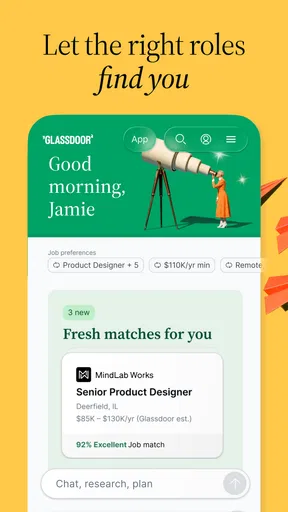
The app kicks off with a clean and intuitive interface. Navigating through it feels as smooth as swiping through your Instagram feed. The home screen offers a blend of job recommendations, popular companies, and trending reviews. With just a few taps, you’re exploring potential career paths or checking out what employees really think about their bosses.
Digging Into the Features
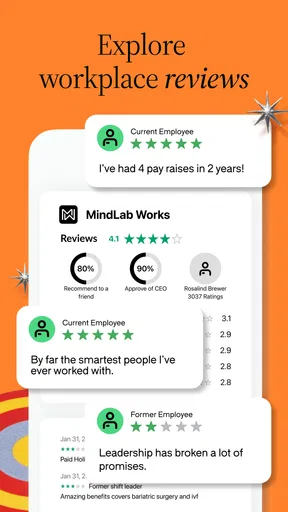
Here’s where things get interesting. Glassdoor stands out with its comprehensive database of company reviews. Employees rate their workplaces on a five-star scale, and these ratings cover everything from work-life balance to CEO approval. It’s like Yelp for companies, and it’s incredibly insightful.
Want to know if a company's claim about a "collaborative environment" is legit? Just dive into the reviews. You might find comments like, "Great place to work, but the coffee tastes like burnt rubber," which is both helpful and oddly specific.
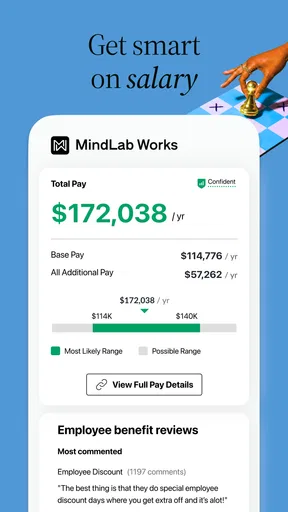
But wait, there’s more! The salary transparency feature lets you peek into the typical paychecks for various roles within a company. It’s a real game-changer for anyone who's ever stumbled over the dreaded “What are your salary expectations?” question during interviews.
Job Hunting Made Easy
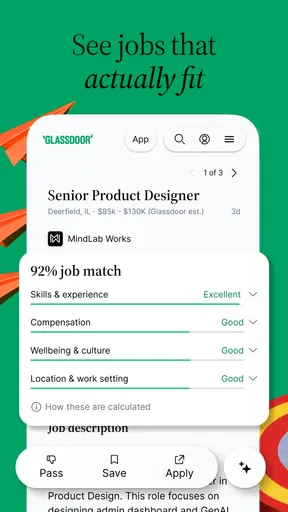
Let’s talk about the job search function. It’s robust, offering filters for location, salary range, company size, and more. You can even save job listings to create a personalized list of prospects or set up alerts for new opportunities. This means fewer hours scouring the web and more time binge-watching your favorite series. Priorities, right?
Applying for jobs is a breeze, with many listings allowing you to apply directly through the app. It streamlines the process, cutting down on the endless forms that make you question your life choices.
Insider Tips and Tricks
Now, here’s a little insider tip—don’t skip the interview questions section. It’s packed with real questions from actual interviews, giving you a sneak peek into what you might face when you walk into that conference room. Think of it as your personal cheat sheet, helping you prepare and maybe even impress your future employer.
Plus, the community Q&A section is a goldmine for advice. Whether it’s questions about career growth, work-life balance, or navigating office politics, the community is there to guide you, one comment at a time.
Choosing it alongside other job-search tools
For a first sweep across a wide job market, a general job board may be faster if all I need is a large set of openings and a simple way to apply. Glassdoor earns its place when I want to examine the employer behind a vacancy. Its combination of listings with reviews, pay context and interview material makes it particularly useful before I decide whether to spend time tailoring an application.
I wouldn’t use it as my only source, though. For roles where specialist boards or professional networks are especially active, those services may surface opportunities and contacts that a company-research app is not designed to replace. My preferred workflow is to discover openings wherever they appear, then use Glassdoor to investigate the employer and prepare questions. That division keeps the app focused on what it does best instead of expecting one service to handle every part of a career search.
The audience fit is fairly broad: a recent graduate can learn what interview topics to practise, while an experienced worker can compare compensation context and workplace accounts before considering a change. It’s less compelling if I already know exactly which employer I’m targeting and only need to submit an application through that employer’s own process. In that situation, the company’s hiring page may be the more direct route, with Glassdoor serving as optional background research.
Small habits that improve the search
I get more from the app when I define a few criteria before browsing: the kind of role I want, a realistic location and the workplace qualities I care about. Then filters can narrow the job list, and saved listings can hold the candidates that survive a first check. This is more useful than saving every plausible opening, because a manageable shortlist makes it easier to compare descriptions and revisit them with a clear head.
For salary research, I’d use the figures as preparation for a conversation, not as a script. A role title can cover different responsibilities, and a reported range may not capture every factor that shapes an offer. I’d pair that context with my experience and the job description, then prepare a thoughtful question about compensation if the process reaches that point. The app helps me enter the conversation less cold; it can’t decide what a particular employer will offer.
Reviews deserve the same careful reading. Instead of focusing on the most dramatic comment, I look for themes that matter to my own working style: how people describe management, workload or flexibility, for example. I also consider whether the account seems relevant to the role and team I’m exploring. If a concern keeps appearing, I can turn it into a specific interview question rather than treating an anonymous post as a final verdict.
Availability, cost and what to expect
The app is free and rated for Everyone, which makes it easy to try as a general career-research tool. It has been available since March 13, 2013, and the current version is 13.4.3; it requires Android 8.0 or later. Its 4.7 average comes from around 670,000 ratings, with roughly 28,000 written reviews, and it has over 10 million installs. Those figures suggest that it has reached a large audience, though popularity alone can’t tell me whether the listings match my field or whether the app suits my search habits.
As with any service built around changing job listings and community contributions, the material is most helpful when I treat it as a starting point and check details carefully. A saved opening is a reminder, not a promise that the role will remain available; an employee review is a perspective, not a guarantee about my future team. I’d revisit important listings before applying and use interviews to clarify anything that could affect my decision.
Wrapping Up the Experience
Overall, Glassdoor feels like a must-have app for anyone in the job market or curious about the workplace landscape. It’s packed with features that inform and empower you, turning the often stressful job search process into a less daunting task.
Whether you’re a recent grad, a seasoned professional, or just someone nosy about company cultures, this app has something for everyone. So, why not give it a whirl and see where it takes you? Your next career move might just be a tap away.
Ready to dive in? You can download Glassdoor from the App Store or Google Play. Happy job hunting!
My connectivity verdict
I see Glassdoor as a connected companion for researching employers and organizing a job hunt, not a replacement for careful application tracking or direct communication with a recruiter. It is strongest when I have a stable connection and a concrete question to answer, whether that’s comparing two workplaces, preparing for an interview or deciding which listing deserves an application.
If you want workplace insight alongside job discovery, and you’re comfortable weighing reviews as individual perspectives, I think it’s worth trying. If your priority is uninterrupted access while offline, a tightly controlled application tracker, or networking first, you’ll likely want another tool alongside it. Used with those expectations, it can make the uncertain parts of a career move feel more informed without pretending to make the decision for you.
Pros
- User-friendly interface for easy navigation.
- Comprehensive company reviews.
- Salary transparency features.
- Job alerts tailored to preferences.
- Access to company ratings and insights.
Cons
- Occasional outdated job listings.
- Some features require a subscription.
- Limited international job coverage.
- In-app ads can be distracting.
- Profile setup can be time-consuming.
FAQs for Glassdoor | Jobs & Careers
What features does the Glassdoor app offer for job seekers?
The Glassdoor app provides users with access to millions of job listings, company reviews, salary reports, and interview insights. It allows job seekers to apply directly through the app, create custom job alerts, and explore detailed company profiles to make informed career decisions.
How reliable are the salary reports and company reviews on Glassdoor?
Glassdoor's salary reports and company reviews are crowd-sourced from employees, offering a realistic and credible glimpse into a company’s work environment. While individual experiences may vary, Glassdoor provides a platform for transparency, helping users get a balanced view by aggregating multiple perspectives.
Can I use the Glassdoor app without creating an account?
While some features, such as browsing job listings, are accessible without an account, creating a free account unlocks additional benefits. These include the ability to read full company reviews, access salary information, and save job searches, enhancing the overall user experience.
Is the Glassdoor app free to use, and are there any in-app purchases?
The Glassdoor app is free to download and use, providing access to a wide array of job-related features. There are no mandatory in-app purchases; however, users can opt for premium features that offer enhanced insights and tools for job searching and career planning.
How can I ensure my privacy while using the Glassdoor app?
Glassdoor takes privacy seriously, offering settings that allow users to control what information is shared. When posting reviews or salary reports, personal information remains anonymous. Users are encouraged to review the privacy policy and customize privacy settings to align with their preferences.


